|
Home
Download
System Requirements
Contact Info
Playing the game
Setting up a Multiplayer Game
High Scores
Creating Maps
Version History
Miscellaneous
Privacy
Map Downloads
|
Starting with version 3.0 2022 the game has 2 rulesets, Old and New (default).
You can change the active ruleset by selecting Old or New in the Settings ->
Rules menu.
The NEW rules
Add armies:
Click on any land you already occupy and place new armies for territories,
continents or cards.
Attack or Move armies:
1. Click on a land owned by you, and you want to attack or move from
2. Click on an adjacent enemy land you want to attack
or
2. Click on an adjacent land owned by you, this is accepted as a move.
A Move ends your turn.
Attack and Move are optional.
Press Next to end your turn.
A more detailed description, based on the Old ruleset
Moving Around
The goal is to occupy every territory on the map of the world.
 |
Initial placement
|
The computer will randomly distribute the territories.
Then the game will pick a player at random to start placement.
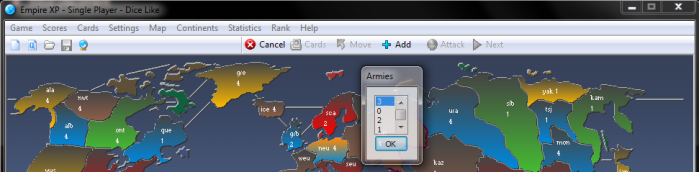
Place 21 armies on your territories:
first select the territory and then select the number of armies you wish to
place there.
There is a limit of 3 armies a player may place on 1 territory during initial
placement.
Repeat this operation until all of your 21 armies have been placed.
Note: the number of 21 armies
varies depending on the map and number of players.
|
|
When it's your turn
|
You receive bonus armies for each continent you control (see Continents window
of the game).
If you exchange cards, you
get extra bonus armies (see Home for more info).
Make a decision, place
armies or attack, you can't do both on a single turn !

|
|
Placing
new armies
|
You get 3 armies (or more)
to reinforce your territories.
Calculation: number of
territories you occupy / 3 discarding any fraction *
The losses counter will be increased by
1 (your troops lose strength), and increased by 2 if your total number of battles is the lowest
of all players (see Statistics window of the game)
This ends your turn.
* for maps larger than 90 territories:
territories you occupy / 4
for maps larger than 120 territories:
territories you occupy / 5
for maps larger than 150 territories:
territories you occupy / 6
for maps larger than 180 territories:
territories you occupy / 7

|
|
Attacking
|
Select the attacking
territory (a territory occupied by you with at least 2 armies on it)
Select the defending
territory (an enemy territory lying next to the attacking territory)
Enter the number of armies
you want to use, no more than the attacking army - 1
The computer simulates the
battle and removes armies (at random) from the attacking and the defending
territory until the attacker loses his armies or the defender is destroyed.
Playing with predictable
battles / 1-for-1 system: the
computer compares the attacking and defending armies leaving behind the
remainder of the biggest army.
Move at least 1 army into
the captured territory.
You get a risk card (no
more than 1 on a single turn).
You may attack as many
times as you like.

|
|
Moving
armies (so-called free moves, if the Move button is enabled)
|
Move
armies (no more than 7) from one of your territories into another territory
occupied by you, providing that the territories are lying next to each other.
This ends your turn.
Note: this has nothing to do with the
'attack phase moves', then you can move all your armies (-1)
to the newly conquered territory after a succesfull attack
|
|
Earning Cards
|
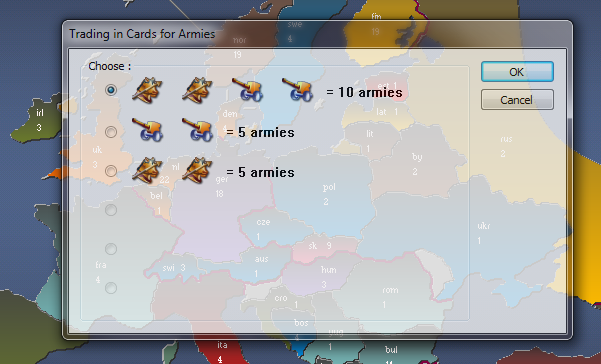
At the end of any turn in which
you have captured at least 1 territory, you will earn 1 card.
If you have collected a set of 2
cards, you may turn them in at the beginning of
your next turn, or you may wait.
If you have 5 cards at the
beginning of your turn you must turn in at least one set.

|
|
Cards display on the status bar
|
e.g.
CIAAW - 5 2 3 4 1
CIAAW - your cards: Cavalry,
Infantry, Artillary, Artillary, Wild card
5 - your amount of cards
2 - computer player 1 has 2
cards
3 - computer player 2 has 3
cards
4 - computer player 3 has 4
cards
1 - computer player 4 has 1 card
|
|
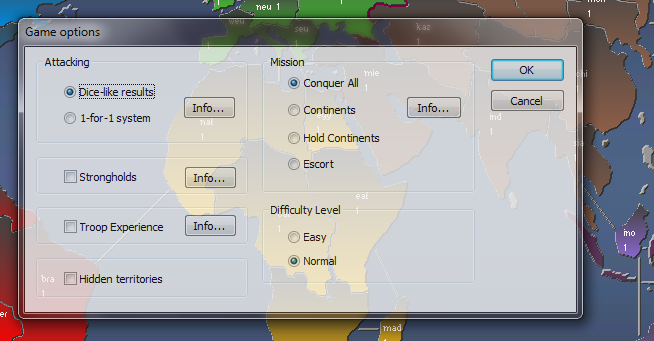
Dice-like / 1-for-1 system |
Dice-like: The outcome of the
attack is unpredictable, a bigger army gives a better chance of winning.
1-for-1 system: Largest force
loses as many as the smaller force, the biggest army always wins the battle.
(This option makes the
game more challenging).
|
|
Strongholds |
Choose a territory as your
stronghold and defend it at all cost.
Without it you lose, and your
territories convert to neutral.
The first territory you pick
during initial placement will be your stronghold and will get 15 bonus armies.
The number of players is
limited to the number of continents on the map.
|
|
Troop Experience |
During battles your troops
will gain experience, whereas avoiding battles will have the opposite effect.
Troop Experience (TE) is shown
as a percentage next to the player's name.
A higher TE will give your
troops defensive and offensive advantages.
Troop Experience begins with
round 10.
|
|
Conquer All mission |
Default mission, you must
conquer everything on the map.
|
|
Continents mission (single player) |
Conquer continents in a
prescribed order, there is no need to hold a conquered continent.
The main window caption shows
the current continent when playing.
The continents window shows
your progress.
AI players play the Conquer
All mission, and are unaware of your mission.
|
|
Hold Continents mission (single player) |
Here losing a continent means
losing the game.
AI players play the Conquer
All mission, and are unaware of your mission.
|
|
Escort mission (single player) |
Escort an AI player to the
end.
You can attack each other if
necessary.
The main window caption shows
your ally.
AI players play the Conquer
All mission, and are unaware of your mission,
including the escorted AI player.
|
|
Quick Launch (single player) |
Quick Launch bypasses several
input dialogs and uses settings of the last saved game.
The enabled buttons (eg. below : Add and
Attack) represent all
possible game actions that are available to you.

Add button is default, so you never need to press Add to place armies (you can
click directly on the country you want if the Add button is enabled).
Cancel the Add command by entering 0 armies.
The game proceeds automatically after you have added all armies (without
pressing the Next button).
To attack a territory (the Attack button must be enabled):
(1) click on the Attack button,
(2) click on a territory to attack from (a country you own, > 1 armies)
(3) click a territory you want to conquer (neighbouring country of (2))
You can continue attacking without pressing the Attack button again.
The Move button works similar to the Attack button, except that there is no
shortcut key.
Press the Next player button to end your turn (the Next button must be
enabled).
Be sure to look at the message bar if you need to know
what to do next :

back to top
|